Multilingual POS interface and MAD, EUR, USD, GBP currency support for each client market.
Lite White Digital
The cafe POS that keeps selling, even without internet.
Touch register for Windows NCR, receipt printing, inventory, staff reports and an owner app connected to the cloud. Simple for staff, powerful for owners.
Offline-firstWindows 7 / 10 / 11Android + WebCloud licenses
Staff work quickly, owners control their numbers, and resellers stay in charge of licenses.
24/7
24/7
International ready
Built to be sold across multiple markets
The same product can serve a local cafe, a cafe group or a reseller installing registers across multiple cities. Languages, currencies, licensing and Windows builds are designed to scale.
Windows 7 ia32 for older NCR terminals, Windows 10/11 x64 for modern machines.
Reseller accounts, clients, machines, renewals and mobile option from one central panel.
The difference: not a generic retail POS
Large competitors often sell broad retail systems. Caisse Cafe Pro focuses on cafes: counter speed, thermal receipts, staff subtotal, drink stock, older NCR terminals and owner tracking.
Cafe-first
Touch products with images, simple ticket flow, coffee + water combo, staff subtotal and daily report.
Offline by default
The register keeps selling if internet drops. Sales stay local, then sync when connection returns.
Old + modern NCR
Windows 7 ia32 build for older terminals, Windows 10/11 build for modern PCs, fullscreen touch mode.
Owner + reseller
Owner portal, Android app, multi-cafe tracking, licenses, machine reset and reseller activation from cloud.
The real problems cafes need to solve
Before talking software, owners mostly want fewer losses, fewer cash disputes and more visibility into what happens at the counter.
Stock disappears
Water, soda and juices decrease automatically after every sale, with alerts when stock becomes low.
Staff are hard to control
Every sale is linked to the logged-in server. At shift end, staff print their subtotal before handing cash over.
Owner is away
From mobile or iPhone, owners see revenue, tickets, sold products, stock and important messages.
Designed for real cafes, not just demos
Everything a cafe needs every day: sell fast, print clean receipts, control staff, count stock and give the owner a clear picture.
Offline register
Sales stay local and safe. When internet returns, tickets sync automatically.
Fullscreen NCR interface
Product buttons with images, ticket on the right, touch keyboard and compact mode for small displays.
Professional receipts
Customer receipt, preparation ticket, optional double print, server subtotal and daily total.
Drink inventory
Stock entry, correction, automatic sale reduction, low stock alerts and movement history.
Owner app
Owners track revenue, staff, products, stock and messages from Android or the web.
Commercial cloud
Licenses, clients, machines, resellers, renewals and notifications from one control panel.
See the complete system before installation
The page shows the NCR register, owner app, receipts and stock tracking. Clients quickly understand what they are buying.
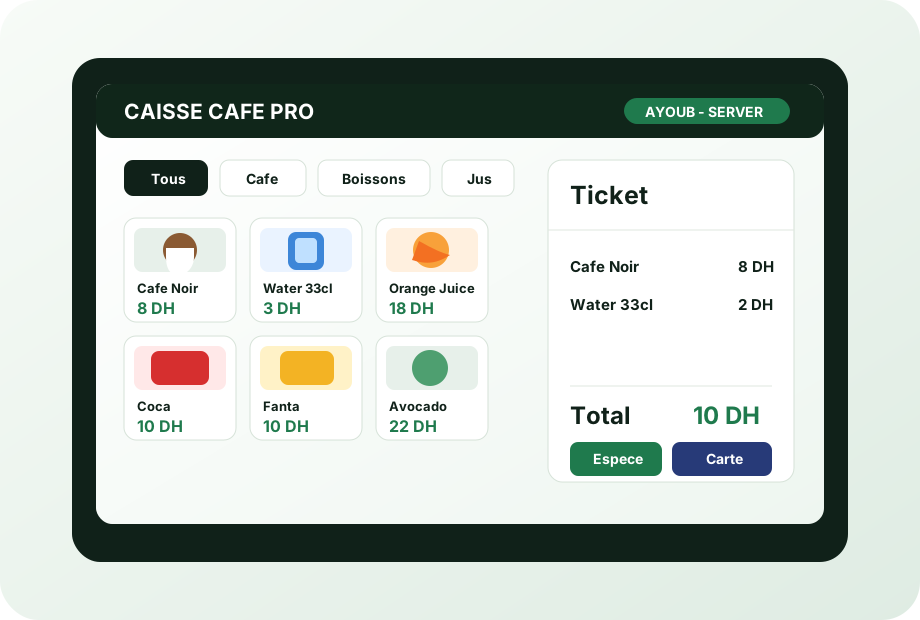
NCR touchscreen register
Product images, quick ticket, cash or card payment.
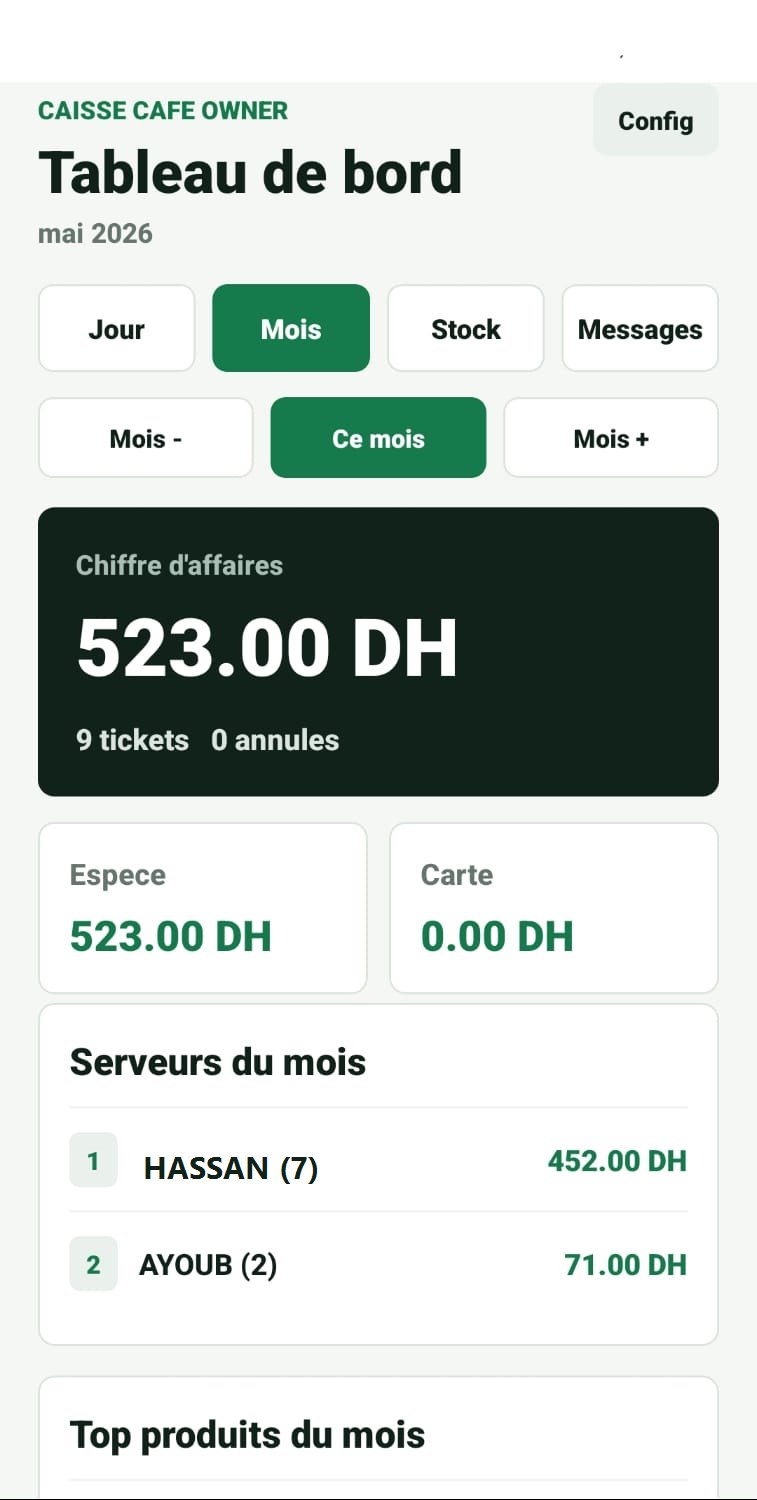
Owner dashboard
Revenue, staff, sold products and stock from mobile.
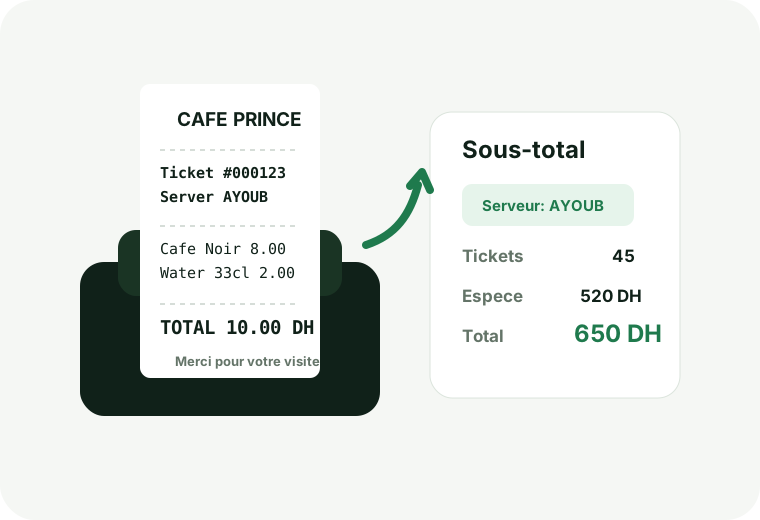
Receipts and reports
Customer receipt, preparation ticket, staff subtotal and daily total.
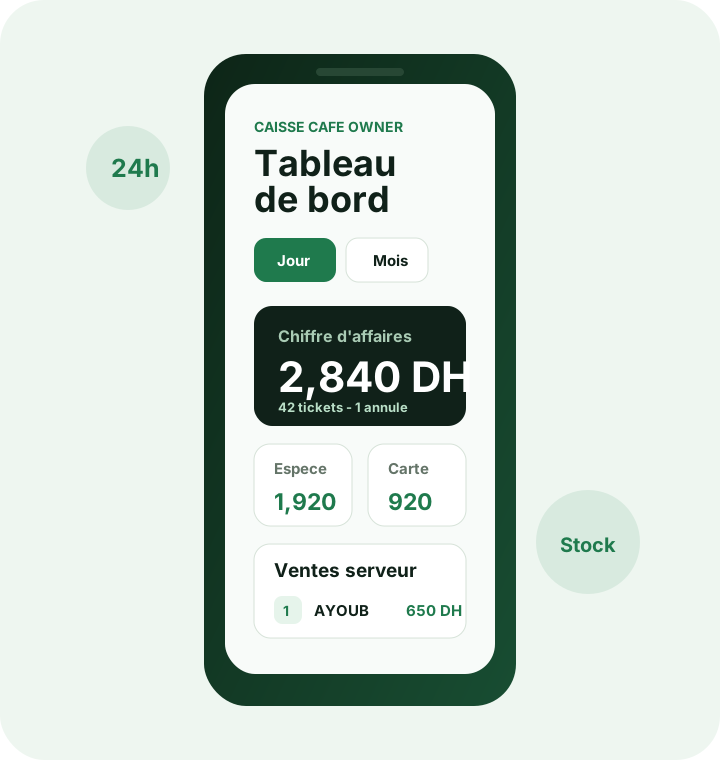
Owner application
Notifications, stock, multi-cafes and management tracking.
What the owner gains every day
Caisse Cafe Pro is not only a register. It turns tickets, stock and shifts into simple information for better daily decisions.
Staff control
Every server works with a PIN. Sales, cancellations and shift subtotal remain linked to their name.
Clear stock management
The owner knows remaining bottles, cans and juices, with stock additions from POS or mobile app.
Useful reports
Daily sales, monthly sales, top products, cash, card and details by server.
Multi-cafe ready
One owner can track multiple cafes with the same PIN, while each cafe keeps its cloud code and license.
POS NCR
At the counter, everything must be fast and clear
The POS stays simple for staff, while the cloud handles license, reports and owner tracking.
- PIN serveur et shifts
- Images produits et tickets rapides
- Sous-total serveur et rapport journalier
- Sync automatique apres chaque vente
How the system works from opening to closing
The POS stays simple for staff, while the cloud handles license, reports and owner tracking.
Install
Install the register on Windows NCR and activate the client license from the panel.
Sell
Staff enter a PIN, open their shift and sell using simple touch product buttons.
Sync
Sales, stock and reports sync to the cloud automatically when internet is available.
Manage
Owners see revenue, inventory and alerts from mobile or browser.
Installation, training and support built into the workflow
The product must be easy to sell and easy to install. The process guides the client from demo to after-sales support.
Machine audit
Check Windows 7/10/11, NCR screen, printer and POS or POS + mobile needs.
Installation
License activation, cafe settings, products, staff, printer and fullscreen mode.
Training
Staff PIN, sales, cancellation, subtotal, stock and daily reports.
Follow-up
Cloud sync, license alerts, reseller support, backup and updates.
Owner app
Mobile app and web portal for owners
Android for a fast experience, web portal for iPhone, tablet and desktop. The owner does not need to be inside the cafe to know what is happening.
- Daily and monthly revenue
- Sales by server and product
- Stock additions from mobile
- License notifications and messages
Cloud panel
Cloud for clients, licenses and resellers
The panel lets you create clients, approve new cafes, activate or suspend licenses, track machines and send notifications.
- POS activation and mobile option.
- Machine binding reset when a client changes NCR.
- Reseller, credit and renewal tracking.
- Messages sent to the app and client portal.
A solution for every cafe stakeholder
Install the register, activate the client, connect the owner and stay in control from your panel.
For cafes
An easy register for staff, with clear receipts, drink stock and reliable shift reports.
For owners
Track staff, daily sales, sold products, low stock and important messages.
For resellers
Create clients, activate machines, renew licenses, control mobile options and manage your sales pipeline.
Operations terrain
Designed for real cafes, not just demos
In a cafe, software must survive internet cuts, fast shifts, thermal printer issues and non-technical staff. Caisse Cafe Pro is built around those real constraints.
- Automatic shift when staff enter their PIN.
- Shift closing with printed subtotal.
- Drink stock reduced automatically after sale.
- Sales saved locally before any printing attempt.
- Cloud control without blocking offline register use.
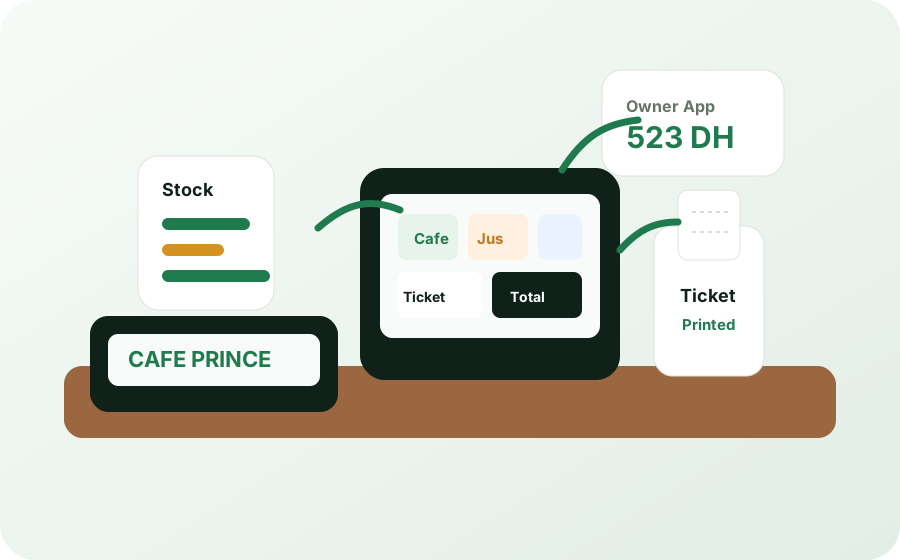
Designed for real cafes, not just demos
100%
Offline-first POS local.
2
Builds Windows: NCR ancien + Windows moderne.
1
Panel pour clients, machines, resellers et licences.
PIN, product images, quick ticket, end-of-shift subtotal.
Revenue, stock, staff, sold products and alerts from mobile.
Activation, renewal, suspension, partners and client support from the panel.
Offers that are easy to sell
A clear structure for POS only, POS with mobile and reseller network.
StarterPOS only3000 DH
Touch register, printing, drink stock and staff reports.
POS renewal: 500 DH / yearBusinessPOS + Mobile6000 DH
Adds owner app, web portal, cloud sync and remote tracking.
POS + mobile renewal: 1000 DH / yearPartnerReseller programOn request
Partner accounts, client activation, renewals and license control.
For selling and supporting multiple cafesContact
Talk to us and schedule a demo
Send the cafe name, city and machine type. We will guide you toward POS only, POS + mobile or reseller program.
FAQ
The important questions before installation.
Installation
Does the register work without internet?
Yes. The POS stores sales locally on the machine and syncs automatically when internet returns.
Is it compatible with Windows 7 NCR?
Yes, there is a dedicated Windows 7 build for older NCR machines and another build for Windows 10/11.
Is it compatible with my thermal printer?
Yes for common Windows/USB printers. During installation, the driver is configured and a test print is done.
What happens if the client changes machine?
You can reset the binding from the panel, then activate the new machine with the same license.
Management
Can owners use it from iPhone?
Yes. Even without Android, the owner can open the web portal from iPhone, Android, tablet or PC.
Can a license be blocked?
Yes. The cloud panel manages activation, suspension, renewal, mobile option and machine binding reset.
How much is renewal?
POS: 500 DH per year. Mobile: 500 DH per year. The client keeps offline POS access until the paid expiry date.
Does mobile stock update the POS?
Yes. Stock commands and new products sent from mobile are received by the register when it synchronizes.
Ready to turn a cafe register into a professional product?
Install the register, activate the client, connect the owner and stay in control from your panel.